Combine Your Tests: Turn Several Saved Tests Into One Focused Session
You have done five Meteorology tests this month. Each one left a handful of questions you got wrong, a few you skipped and a couple you flagged red. Until now, revisiting them meant opening each test on its own and working through them one by one.
From today you can combine them. Pick your saved tests, choose which questions to keep, and get one new test that brings them all together.
How it works
- Open Saved Tests and stay on the Study tab.
- Tick the checkboxes of two or more tests from the same subject.
- Click Combine in the toolbar.
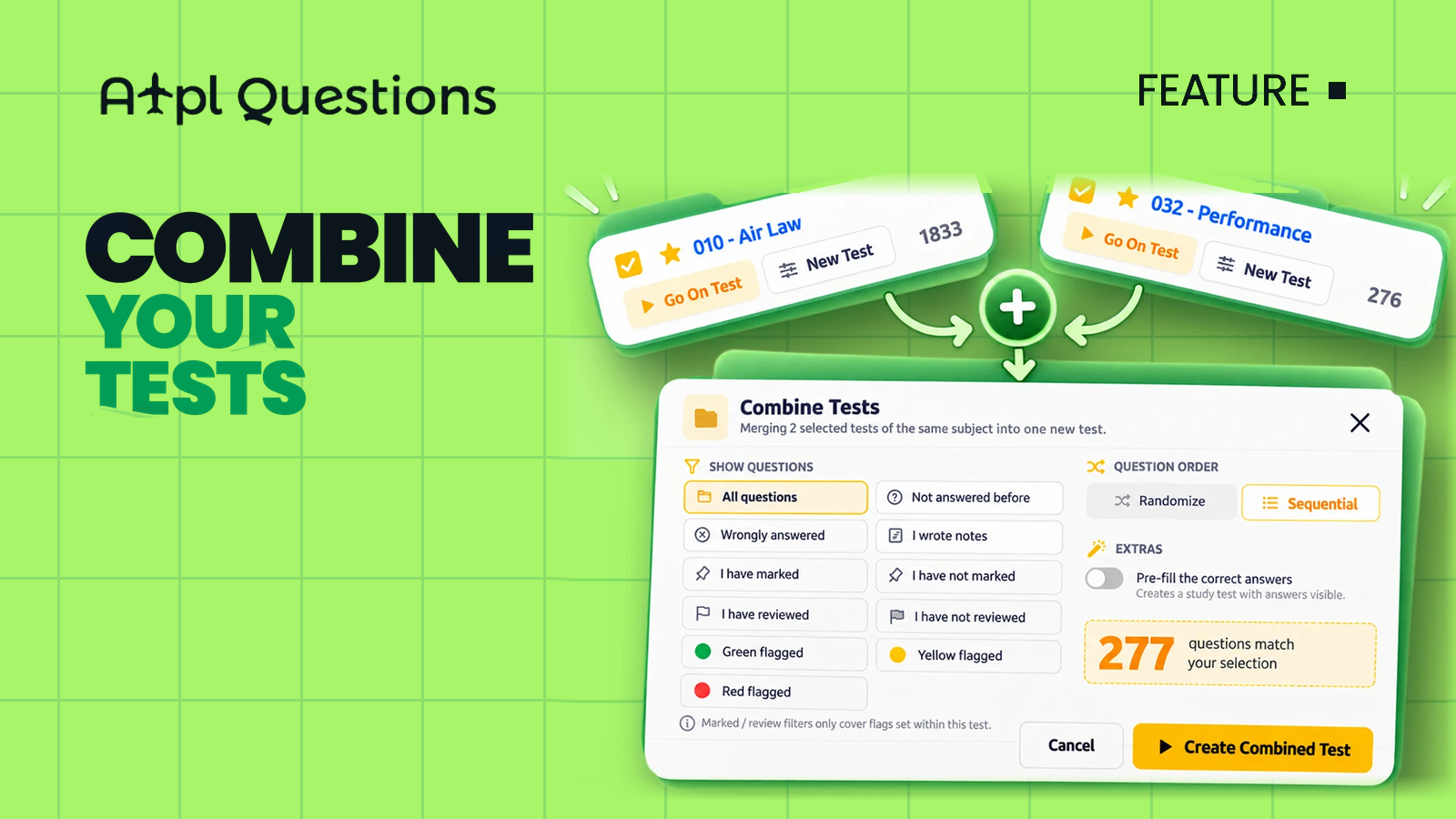
- Choose which questions to include, the question order, and whether to pre-fill the answers.
- Click Create Combined Test.
Your new test appears in Saved Tests as Combined (N tests) – …, ready to start. The original tests stay exactly as they were.
Choose which questions to keep
The Show questions options are the same ones you already know from a single test's New Test window, now applied across all the tests you selected:
- All questions — every question from every selected test.
- Wrongly answered — only the questions you got wrong.
- Not answered before — the ones you skipped.
- I wrote notes — questions where you left yourself a note.
- I have marked / I have not marked and I have reviewed / I have not reviewed.
- Green, Yellow or Red flagged — your colour-coded questions.
Before you create the test, the window tells you exactly how many questions match your selection, so you know the size of your session up front.
Each filter is applied to each source test on its own, then the results are merged. A question that appears in more than one of your tests is included only once.
Order and extras
- Randomize shuffles the questions; Sequential keeps them in their original order.
- Pre-fill the correct answers creates a study test with the answers already visible — useful for a quick read-through of the questions you keep missing.
Three ways to use it
- The weekly clean-up. Combine the week's tests on one subject with Wrongly answered and redo only your mistakes.
- The red-flag drill. Combine everything with Red flagged before a mock exam to hit your weakest questions in one go.
- The skipped questions. Use Not answered before to finally cover the questions you kept leaving for later.
Good to know
- Only tests from the same subject can be combined. If your selection mixes subjects, you will be asked to choose tests from one subject.
- The combined test is always a study test.
- Marked and review filters only count flags you set within each selected test.
- Your saved tests limit applies, just as when you create any new test.
Open Saved Tests, tick a few tests from the same subject and click Combine. One session, only the questions that matter.